
DoctorLink is your virtual health assistant that can be used to check your symptoms and book all kind of appointments. It provides the ability to seek clinically approved medical advice and it solves the current pressures & demands on NHS face to face consultation waiting times and reduces unnecessary surgery appointments,
MY ROLE
UX/ UI designer
PLATFORM
iOS/ Android app
TIME
9 month
CONTRIBUTION
DELIVERABLES
-
Research
-
User flow, Sketching
-
Wireframes, High quality design
-
Interaction design
-
Reduced patient drop-off by 40% with a simplified video join flow.
-
Designed and delivered responsive consultation UI across web and mobile.
-
Created clinician and patient dashboards to streamline appointment access.
-
Improved call success rate by 30%
-
Introduced smart triage routing to reduce wait times by 50%.
YEAR
2019
WEBSITE
DISCOVERY

Research Goals
-
Explore GPs’ perspectives on video consultations
-
Discover how and why people prefer to schedule appointments
-
Understand what information people typically seek on the website
-
Learn how much time patients are willing to spend on video calls
-
Find out how much time clinicians have for each video call
-
Gain insights into the industry and current trends
-
Identify key pain points users experience on the app
Method

Overall, 30 users — including both doctors and patients — participated in interviews and market research. During each session, they were asked to provide a differential diagnosis and complete a survey based on the Theory of Planned Behavior, documenting their views on the value of video consultations.
Feedbacks
-
Approximately two-thirds of study participants had a positive attitude toward video consultations
-
Video consultations are not suitable for patients with acute symptoms
-
GPs who were more positive about video consultations tended to work in larger practices
-
Video technology is particularly useful for follow-up consultations
-
Patients showed strong interest in video consultations
-
Video consultation techniques should be incorporated into medical education
CHALLENGE

-
Integrating the system with existing platforms and aligning the new service with practice workflows
-
Ensuring the video experience functions smoothly within the existing consumer iOS app and the Doctorlink web app
-
Creating a seamless video consultation journey for both patients and doctors
-
Designing a conversational UI that supports compassionate interactions, enabling doctors and patients to communicate comfortably for accurate diagnosis and treatment planning — including prescriptions
-
Defining which symptom outcomes are eligible for booking a video consultation
TASK FLOW
Performing the task flow allowed me to identify the key screens involved in the video consultation journey and understand how Doctorlink users complete the main task. We focused on critical questions: How do users arrive at the site? What paths do they take through the platform? And how do they ultimately reach their appointment? Mapping this flow was essential for defining the user journey and informing the structure of the site.

USER JOURNEY
Based on the previous task flow and what we know about their habits, this user flow walks through the persona's journey through the site, taking into account various decision points along the way.

SKETCHES
After reviewing several competitor apps and finalizing the flow chart and site architecture, we gained a clear sense of how the application should look. Our goal was to keep the design loose and fluid, avoiding getting bogged down in details too early. This exercise helped me begin thinking about the placement of content on each page. Using sketches enabled rapid iteration and the quick generation of ideas.


RESPONSIVE WIREFRAMES
I created a low-fidelity prototype (LFP) to explore the app’s wireframes, understand how it functions, and identify cause-and-effect relationships between buttons and screens, as well as any search details that needed adjustment or removal. I then tested the prototype with clinicians and users to gather their feedback. After analyzing their input, we proceeded to develop the high-fidelity prototype. This stage enables us to test the app with a larger audience and collect more comprehensive feedback.
PROTOTYPE
The high-fidelity prototype was created to prepare for usability testing. In this phase, we define what aspects we want to test and why. For this project, the focus is on the main task flow: booking a service using the online booking feature. We developed a test plan and built the flow within our prototype using InVision and Figma.

USER TESTING

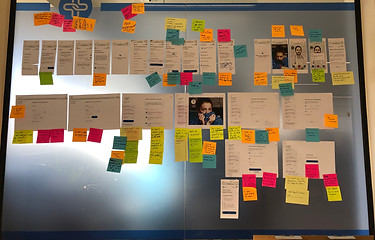
Participants
-
20 total test subjects
- 10 in-person
- 10 remote, unmoderated

Test Objectives
-
Discover how easily users can navigate the app to complete their tasks
-
Observe how users search for and find the desired service
-
Identify which methods users employ to book their appointments
-
Test the overall ease of navigating the app
-
Observe any difficulties or obstacles that may prevent users from completing their tasks
Test Summary
In Person Testing
-
Users generally had little trouble understanding the icons
-
Some frustration was expressed about waiting for the doctor to join the call
-
Difficulty reading certain text was reported
-
Users expected to have appointments without going through triage
Unmoderated Remote Testing
-
20% of users completed the task without any issues
-
14.3% of users took an alternate route to complete the task
-
Challenges were noted during the registration process
-
Users felt there were too many questions to answer
RESULT
