
Designing an AI interviewer that candidates trust and recruiters can rely on
Indeed Flex connects people with temporary work. I designed the AI Interview, a conversational screening step inside the app. It combines fixed, role-specific questions with AI-driven follow-ups.
COMPANY
Indeed FLex
MY ROLE
UX/UI Designer
PLATFORM
iOS and Android, plus recruiter setup
TIMELINE
6 months · 2024–2025
WORKED WITH
Product, engineering and the AI team
01- THE PROBLEM
Scheduling human interviews was slow, and recruiters couldn't compare candidates fairly
For high-volume temporary roles, candidates waited and dropped off. Recruiters had no consistent way to line one candidate up against another.
CANDIDATE
Speed and clarity
Screening had to be fast, and it had to feel fair. Candidates wanted to know how long it would take and what happened afterwards.
EMPLOYERS
Consistent, comparable assessments
Recruiters needed a reliable signal. They wanted answers they could compare across candidates without re-reading every response.
The design challenge
The interview had to feel fast and human to the person taking it, and produce structured, comparable data for the person reviewing it.


02 · Research
Two groups with two different needs shaped every decision
I combined competitor analysis, user interviews with candidates and recruiters, and a review of existing hiring data to find where screening broke down.


03 · Ideation and interface design
Three open questions decided the design
An established design system was already in place, so I skipped low-fidelity exploration and worked directly in high fidelity. The trade-off was exploring fewer alternative layouts, which I offset by testing interactive prototypes against these three questions.
01
Entry point
QUESTION
Launch right after applying, or as a separate scheduled step?
DECISION
Inside the application flow. Candidates expected the interview to follow the application directly, and it removed a scheduling step.
02
Question format
QUESTION
Text prompts or a chat-style conversation?
DECISION
Chat won. It matched how candidates already expect AI tools to behave and lowered the learning curve.
03
Feedback during the interview
QUESTION
Should candidates see any signal about how an answer landed?
DECISION
Neutral progress signals only, such as which question they're on and a clear acknowledgement. No signal about quality, because showing scoring criteria could let candidates game the interview.


04 · Conversation design
I designed a relationship the candidate trusts for one conversation, not a form
I defined the tone, pacing and boundaries: how the AI introduces itself, signals what is evaluated, responds to unclear answers, and closes. I drafted the intro, tone and closing, then reviewed them with the AI team so the prompts matched what the system could do.
01
State the rules up front
Before the first question, candidates see what the AI assesses and how their answers are used. That removes the ambiguity that makes AI-led evaluation feel unfair.
03
Keep the voice human
Prompts use plain, warm language, closer to a recruiter than a system, to close some of the gap an automated format creates.
02
Never let the candidate feel stuck
Unclear or off-topic answers get a clarifying follow-up, not a silently scored bad signal. A conversational misstep is never penalised.
04
Always close the loop
At the end, candidates are told what happens next and when, so an automated process doesn't end in silence.


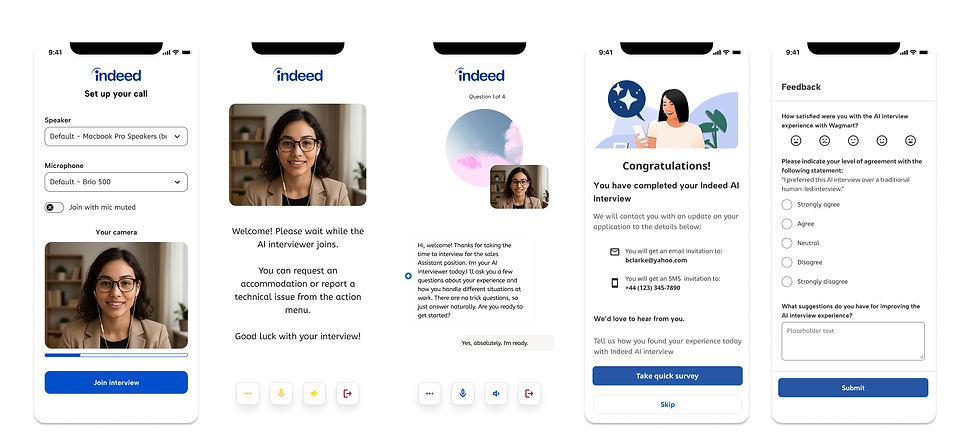
Accommodation request handled mid-interview, without restarting or losing progress

Off-topic branch — re-asked with added context instead of scored as a failure
Conversation design principles in an actual exchange
Before and after AI interview

05 · Dialogue pattern
Fixed core questions for comparison, adaptive follow-ups for a natural conversation
Instead of a rigid question list or a fully open chat, I designed a hybrid. The system adapts to each answer, so a good candidate isn't scored on a rushed first reply.
Step 1
AI asks a core question
A structured question related to the role.
Step 2
Candidate responds
The system captures the answer.
Step 3
AI evaluates
It looks for signals such as experience, clarity and relevance.
Clear, sufficient answer
Move to the next core question
The conversation keeps its pace.
Step 4
AI decides what's next
One of three branches, below.
Vague or incomplete answer
Ask a targeted follow-up
A good candidate isn't scored on a rushed first answer.
Off-topic or confused answer
Re-ask with added context
The misunderstanding isn't logged as a failure.
Why a hybrid
A fixed script gave consistency but felt rigid. A fully open conversation felt natural but was hard to compare. Fixed core questions with AI-driven follow-ups gave candidates room to represent themselves and gave recruiters a more honest, comparable signal. If a candidate doesn't understand a question, they can ask for it to be repeated or rephrased.
Working with the AI and engineering teams
Defining the UI for AI-generated content
I worked with the AI scientists and engineers to agree what the model could generate (follow-up questions, short acknowledgements) and what had to stay fixed (core questions, scoring).
Feasibility
We agreed limits the system could meet, such as the number of follow-ups per question and how long a reply could take, so the design never promised more than the model could deliver.
Latency
Language models and speech recognition take time to respond, so I designed typing and "taking longer than usual" states so people never mistake silence for failure. See section 08.
Where I pushed back
Engineering leaned towards a fully open AI conversation, because it felt natural and was simpler to build. I argued for fixed core questions with AI follow-ups, because an open chat made candidates hard to compare. We tested both, and the hybrid won on consistency for recruiters while still feeling like a conversation.
06 · When things go wrong
AI can be slow, unsure or wrong, so a candidate is never penalised for it
AI-led interviews fail in ways a form can't. Connections drop, answers are unpredictable and replies can lag. Each state is designed around one principle: nothing that isn't the candidate's fault counts against them.

The AI is slow
PROBLEM
Silence reads as an error, and people abandon.
DESIGN RESPONSE
A typing indicator appears at once. If the reply takes longer, a short message says so and the candidate keeps their place.

The connection drops
PROBLEM
A technical failure could cost someone a job opportunity.
DESIGN RESPONSE
Progress is saved after every answer. The candidate returns to the question they were on, with a message confirming that nothing was lost.
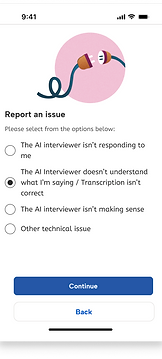
The AI misunderstands
PROBLEM
An unclear or off-topic answer could be scored as a failure.
DESIGN RESPONSE
The AI re-asks with added context, and the candidate can ask to repeat the question, rephrase it, or request an accommodation.
Edge cases and guardrails
The AI asks something irrelevant or biased
Follow-ups can only come from an approved list of topics tied to the role, and never touch protected characteristics. Anything outside that list is blocked before the candidate sees it.
The answer can't be understood
The AI rephrases once. If it still can't parse the answer, the candidate is offered another way to answer (type instead of speak), and the question is never scored as a failure.
The AI gets it wrong in the recruiter summary
Every summary line links to the candidate's own words (a quote or audio clip), so recruiters can check it instead of trusting it.
07 · Accessibility
Candidates can ask for an accommodation mid-interview without losing progress
AI-led interviews can create extra barriers for people who need accommodations. The request is handled inside the conversation, so the candidate doesn't have to restart, leave the flow or contact support. I designed the key moments (the request, the confirmation and the return to the question) with accessibility in mind: clear text labels, large touch targets, and no time limits. [I have not run a formal WCAG audit. That’s on my list of next steps.]

08 · User testing
Testing changed how the conversation reads and where the candidate is in it
Before the interview design was finalized, the AI interview team ran an unmoderated and moderated preference study on UserTesting.com in February 2025. 100 active job seekers, across ages, industries, and comfort with technology, chose between design variations and explained why
100
active job seekers, with mixed ages, industries and comfort with technology
6
Design decisions voted on, from the interviewer visual to the progress indicator


I worked on this study with our UX researcher. I designed the variations, took part in the study and the follow-up calls, and watched participants work through the tasks. I used what I saw, not just the vote counts, to make the design decisions below.
Three things that shaped the design
01 · Humanness and honesty
People wanted a human face, and wanted to know it was an AI. 45 of 100 chose a real photo of a recruiter and 33 chose a human-like avatar, but some called the photo misleading or "creepy". The avatar was the middle ground.
"It makes the most sense; it's good to have an idea of whom you are talking to."
"I don't like using a 'real' person; it is kinda creepy."
02 · Progress, not pressure
Progress felt reassuring. Timers felt like pressure. 89 of 100 wanted some progress indicator (47 text, 42 stepper). The timer got 2 votes.
"The timer feels like it's timing me and can make me anxious." Participant
03 · Familiar patterns
Familiar patterns won. A highlight ring around the speaker (56) beat a soundwave (22) and a pulsing effect (22), and branded speech bubbles took 77 of 100 votes.
"The highlight most closely aligns with the video conference programs I use - Google Meet and Zoom - so it feels most intuitive." Participant
A finding from testing the MVP: people weren't ready
WHAT I SAW
When we tested the MVP, some people joined the interview before they were ready. Some had just woken up, and some weren't dressed for an interview. Starting the call straight away left them unprepared and uncomfortable on camera.
WHAT I CHANGED
I added a waiting room and a short preparation step before joining the call. People see a checklist and a camera preview, and they join when they choose to.
WHY IT MATTERS
Being ready affects how a person comes across, so a rushed start could make the interview less fair to them. The waiting room puts them in control of when it begins.

09 · The recruiter side
Recruiters configure the interview, so what candidates see matches what employers control
I also designed the interface recruiters use to set up the AI Interview.
01
Post jobs
Create and post listings by role and department.
02
Choose questions
Pick from a template library or write your own.
03
Set Criteria
Define required skills and time limits for the assessment.
04
Review progress
See candidate progress and analytics in real time to refine hiring criteria.


10 · Impact and what I learned
Hiring got faster, clearer and more consistent for both sides
The AI Interview reduced scheduling friction and standardised the interview journey across high-volume roles. The design drove completion and clarity. Time-to-interview also reflects the AI evaluation and the removal of scheduling steps.
40%
Reduction in time-to-interview
60%
Decrease in scheduling friction
40%
Improvement in interview completion rate
Figures from the Indeed team's measurement of the rollout.
Trust needs transparency
Candidates need to know what's being evaluated and how. Showing it before the first question made the process feel fairer, so it became the first thing they see.
Adaptive beats static
Follow-ups that respond to answers gave candidates room to represent themselves and gave recruiters a more honest signal.
AI works best as decision support
It surfaces insight quickly. Recruiters stay in charge of decisions.
Systems thinking matters
The experience goes beyond the interface to how answers are captured, analysed and presented for review.

11 · Where I'd take this next
If I had more time
These are explorations, not shipped work.
Test the hard cases
Run moderated sessions on the failure and accommodation screens, with non-native English speakers and screen-reader users. The study compared designs but never tested these moments
Evaluate the AI
Review the conversation, not just the screens. With research and ML partners, agree a short quality rubric covering clarity, tone, relevance and fairness. Then review a sample of real transcripts against it, including answers from non-native speakers.
Accessibility audit
Audit the full flow against WCAG 2.2 AA. Test with a screen reader, keyboard only, large text and reduced motion, ideally with people who use them every day. Chat interfaces often fail here, for example when new messages aren’t announced or time limits cut people off.